Use Case

One grants system,
every award in it.

How we replaced a spreadsheet-per-grant habit with a three-tier Smartsheet portfolio — standardized intake, blueprint provisioning, and executive rollups that assemble themselves.

Sector Nonprofit grantmaking
Structure Portfolio / Program / Grant
Platform Control Center, Dynamic View
Applicant licenses Zero required
01 The Problem

Every new grant meant another spreadsheet.

A grantmaking nonprofit was scaling its portfolio faster than its tracking could keep up. Each awarded grant lived in its own ad hoc spreadsheet, built by whoever managed that program, structured however made sense at the time.

Three tiers, one hierarchy.

The design decision that drives everything downstream is the reporting hierarchy. Get it right before building anything, because every dashboard, rollup, and automation inherits from it.

TIER 01

Grant / Award

An individual workspace — the day-to-day system of record for one award. Schedule, budget, deliverables, disbursements, and the fulfillment team all live here, and this is where program staff actually work.

Workspace per award Task-level tracking
TIER 02

Program

Groups grants that share a funding source or initiative. This is the tier that answers "how is this funder's money performing overall," which is usually the question that spreadsheets could never answer without a manual merge.

Funder rollup Initiative grouping
TIER 03

Portfolio

Executive rollup across every active grant. Spend trends, distribution, health status, and upcoming expirations in one view — assembled from live data rather than compiled from submissions.

Executive dashboard Live rollup
TIER 00

Archive

Closed awards move out of the active portfolio without leaving the system. Historical grants stay queryable for audits and funder look-backs, but stop cluttering the dashboards leadership uses to run the current cycle.
Audit trail Close-out
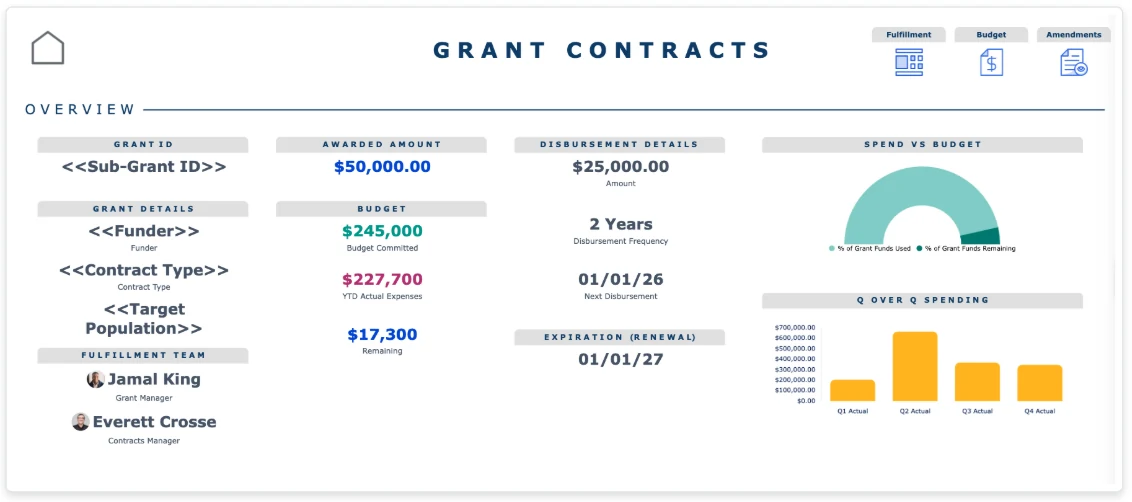
Smartsheet grant contracts dashboard showing awarded amount, budget committed, actual expenses, disbursement schedule, spend versus budget gauge, and quarterly spending
The grant tier. One award’s workspace — funder, contract type, budget committed against actual spend, disbursement schedule, renewal date, and the fulfillment team in a single view.
03 The Build

The same four components, every time.

Standardization is what makes the rollups possible. Every grant workspace gets provisioned with an identical structure, so portfolio reporting never has to reconcile four different ways of recording a budget line.

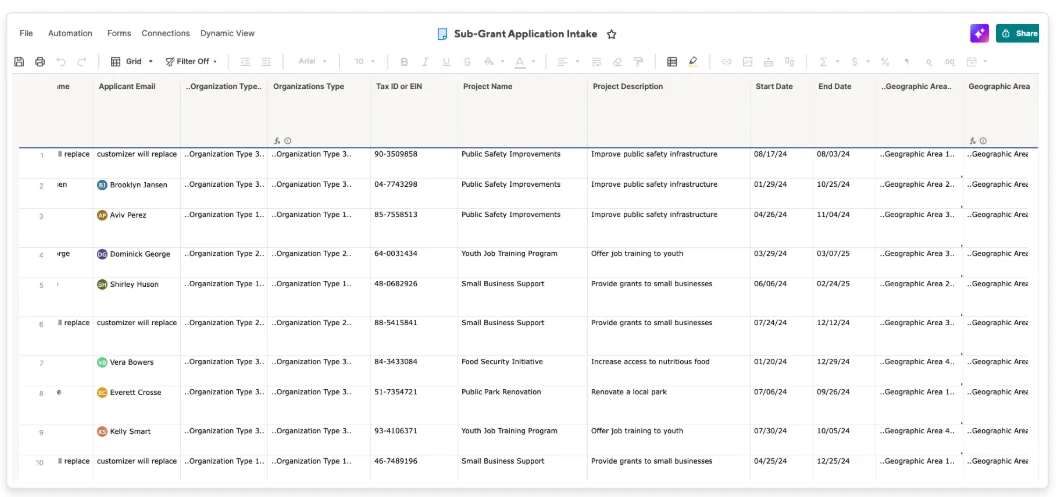
Smartsheet sub-grant application intake sheet showing applicant details, organization type, tax ID, project name, description, and grant period dates
Standardized intake. Every application lands as a structured row with the same fields captured the same way — not an email attachment somebody re-keys.

Where this build earned its keep.

Most of the structure above is good practice. Two choices are what let the system scale past the point where a spreadsheet approach usually collapses.

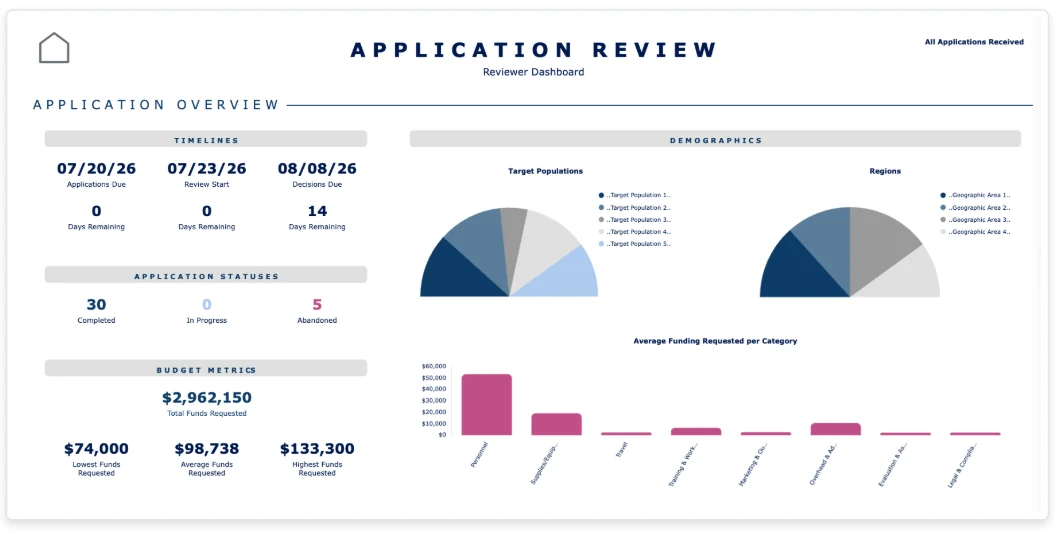
Smartsheet grant application review dashboard showing submission timelines, application statuses, budget metrics, target population and regional demographics, and average funding requested by category
Permissioned review. Reviewers get scoring access and program-level analytics; applicants see only their own submission. Same underlying sheet, filtered by role.
01

Control Center provisioning

The workspace structure gets built once as a blueprint, then provisioned many times over. A new grant spins up a complete, standardized workspace in minutes instead of being assembled by hand.

Because scoping is driven by the number of distinct blueprint types rather than the number of grants, running ten awards and running a thousand is the same build.

02

Dynamic View for external users

Applicants and reviewers get permissioned access to a single sheet, filtered by role, presented as a clean details panel rather than a grid. Reviewers can score; applicants cannot see the scoring.

External collaborators need no Smartsheet license — only the owning organization is licensed. For a grants program with hundreds of applicants, that is the difference between viable and unaffordable.

03

Reporting tiers designed first

Portfolio, program, and grant were defined before any sheet was built. Every dashboard and rollup downstream inherits that hierarchy, so adding an award never triggers a reporting rebuild.

Teams that skip this step usually end up rebuilding their dashboards on the second or third funding cycle.

05 The Outcome

What changed
after the build.

The portfolio kept growing. The reporting effort stopped growing with it — which was the whole point.

01

Consolidated visibility.

Leadership sees every award without navigating individual workspaces or asking program managers for status.

02

Faster reporting.

Funder and leadership reports pull from live rollups instead of manual compilation across scattered files.

03

Consistent structure.

Every new grant follows the same standardized workflow, so data stays comparable across the portfolio.

04

Built to scale.

The system grows with the portfolio. Adding awards does not require rework of the reporting layer.

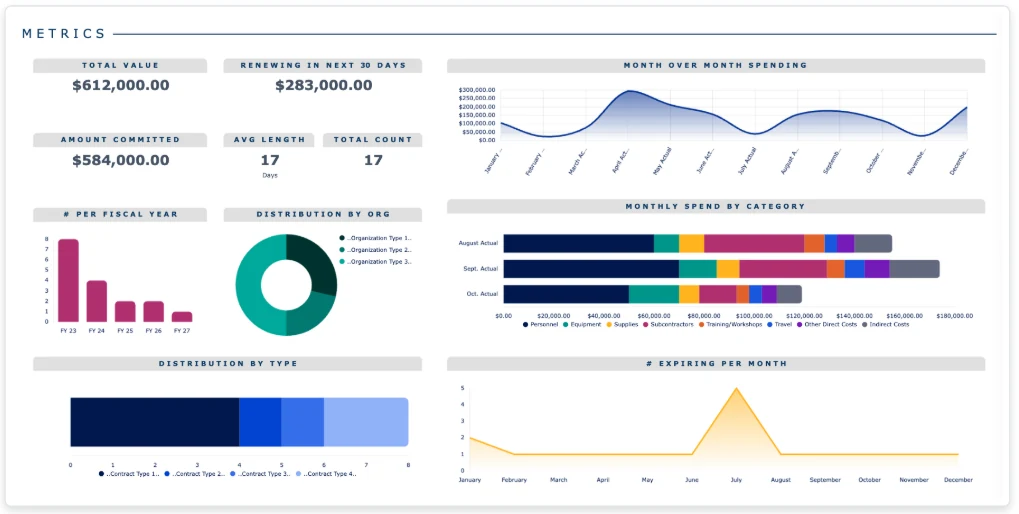
Smartsheet grant portfolio metrics dashboard showing total portfolio value, amount committed, awards renewing in 30 days, month over month spending, monthly spend by category, distribution by organization type, and grants expiring per month
The portfolio tier. Total value, committed spend, renewals due, category breakdowns, and expirations across every active award — the reporting layer a spreadsheet-per-grant approach can never produce.
06 Questions

What teams ask about this build.

No. Applicants submit through a Smartsheet form, which requires no license or account. Reviewers and applicants who need ongoing access to their own records use Dynamic View, where only the owning organization holds licenses. This is usually the deciding cost factor for programs with a large applicant pool.

Core Smartsheet handles the intake, tracking, and reporting. Control Center adds blueprint-based provisioning, which matters once you are creating enough grant workspaces by hand that consistency starts slipping. Programs running a handful of awards a year often start without it and add it when volume justifies it — we will tell you honestly which side of that line you are on.

It depends on how many distinct grant types you run, not how many grants. Programs where every award follows one structure move considerably faster than programs juggling several fundamentally different funding mechanisms. A Discovery Workshop establishes which situation you are in before anyone commits to a scope.

Yes, and the reporting tiers usually map cleanly onto subrecipient structures. Public-sector programs typically add compliance requirements around audit trails, retention, and permission separation, which shape the build but do not change the underlying pattern.

That is common and it is handled with multiple blueprints rather than one. The scoping question is how many genuinely distinct structures exist — often fewer than teams assume, because differences that feel fundamental turn out to be field-level rather than structural.

Run your grants program
on one system.

Whether you are consolidating spreadsheets or scaling a portfolio that has outgrown its structure, we will map what you have and tell you honestly what we would build.

Ready to talk

Book a 30-min
discovery call.

Pick a time that works. We will come prepared with questions about your funding cycles and reporting obligations.

Schedule on Calendly
More on grants

See our grant
management practice.

Lifecycle tracking from application through close-out reporting, across state agencies, nonprofits, and higher education.

Grant management